
Making Tax Digital for Sole Traders in 2026: A Practical Guide for UK Trades
If you are a sole trader in the trades and your admin still lives across paper receipts, van folders, WhatsApp messages and a year-end spreadsheet, Making Tax Digital for Income Tax is no longer a distant deadline.
For the first mandated group, the rules started on 6 April 2026. That means some sole traders and landlords now need to keep digital records, send quarterly updates to HMRC through compatible software and submit the final tax return through software by the usual 31 January deadline.
This guide is written for UK trades businesses using WorkBookPro as the operational home for quotes, jobs, invoices, expenses and job profitability. It is practical guidance, not personal tax advice, so check your position with your accountant or HMRC if your circumstances are more complex.
The Quick Answer
You are in the first 2026 Making Tax Digital group if your 2024 to 2025 Self Assessment tax return showed more than £50,000 of qualifying income from self-employment, property, or both.
Qualifying income is measured before expenses. In other words, HMRC looks at turnover from your sole trade and property income, not profit after materials, fuel, subcontractors, rent or other costs.
The thresholds are being introduced in stages:
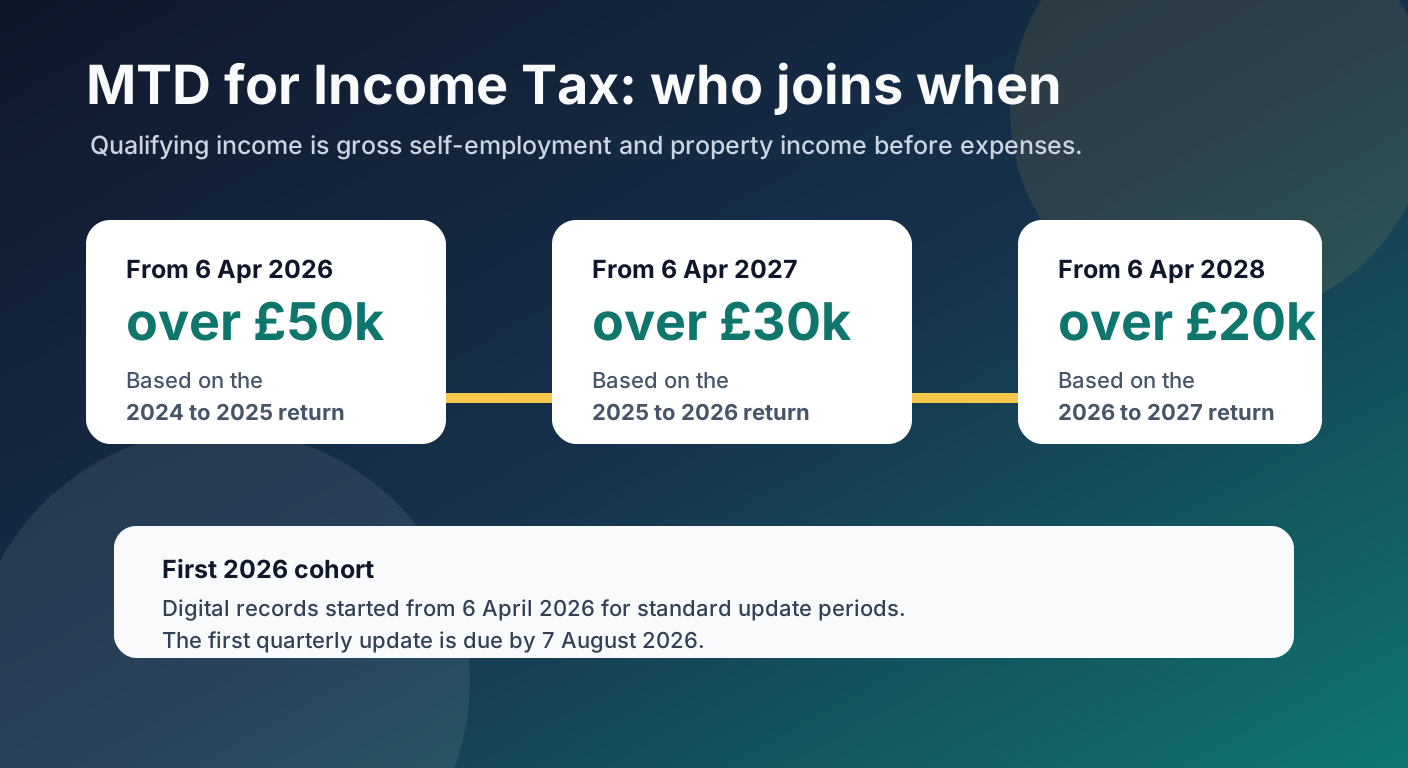
For a busy trades business, the gross-income rule matters. A plumber, electrician, builder, air conditioning engineer or landscaper can pass the threshold quickly even when margins are tight because materials and subcontractor costs do not reduce the qualifying income figure.
What Counts as Qualifying Income
Qualifying income includes income from self-employment and property. If you have a sole trade and a rental property, HMRC combines them for the threshold test.
Common items that do not count toward qualifying income include PAYE employment income, dividends, State Pension, private pensions and your share of partnership profit as an individual partner.
HMRC may write to you if it believes you are in scope, but you still need to check for yourself. Not receiving a letter is not the same as being outside the rules.
What Actually Changes Under MTD
Making Tax Digital does not change the underlying tax year, and it does not mean you pay Income Tax every quarter. The big change is the workflow.
Under MTD, you need to:
- Keep digital records of self-employment and property income and expenses.
- Send quarterly updates to HMRC through compatible software.
- Make year-end adjustments and submit the final tax return through software.
- Pay any tax due by 31 January after the end of the tax year.
Quarterly updates are summaries of income and expenses. They are not full tax returns, but they still depend on accurate digital records.
The 2026 to 2027 Deadlines
For standard update periods, the first MTD year has these deadlines:
| Requirement | Deadline |
|---|---|
| Start digital records | 6 April 2026 |
| First quarterly update | 7 August 2026 |
| Second quarterly update | 7 November 2026 |
| Third quarterly update | 7 February 2027 |
| Fourth quarterly update | 7 May 2027 |
| Final tax return for 2026 to 2027 | 31 January 2028 |
If your accounting period ends on 31 March, HMRC says calendar update periods can apply, with digital records from 1 April 2026. Your software and accountant should confirm the correct setup before the first update is submitted.
HMRC has said it will not apply penalty points for late quarterly updates for the 2026 to 2027 tax year. That is a soft landing, not a free pass. You still need to send quarterly updates before you can submit the final tax return, and late tax return or late payment penalties can still apply.
What Digital Records Need to Include
For each income or expense record, HMRC expects the digital record to include:
- The amount.
- The date the income was received or the expense was incurred.
- The correct income or expense category.
You still need to keep normal Self Assessment evidence, such as invoices, receipts, bank statements and supporting documents. MTD is about keeping the transaction data digitally; it does not remove the need to prove what happened if HMRC asks.
Sole traders with turnover below the VAT registration threshold can use simpler categorisation for that income source. For a sole trader, that can mean recording whether a transaction is income or expense rather than using every detailed Self Assessment category. If turnover reaches £90,000, full categorisation is needed before quarterly updates or the final tax return can be submitted.
How WorkBookPro Fits the Workflow
WorkBookPro should sit at the front of the process: the place where the commercial reality of the job gets captured while it is still fresh.
That means using WorkBookPro to:
- Raise quotes and turn accepted work into jobs.
- Create invoices promptly.
- Record job-related expenses as they happen.
- Keep supplier costs, labour, materials and notes attached to the job.
- Review profitability before the end of the tax year.
- Export or connect clean data into your accounting or tax software.
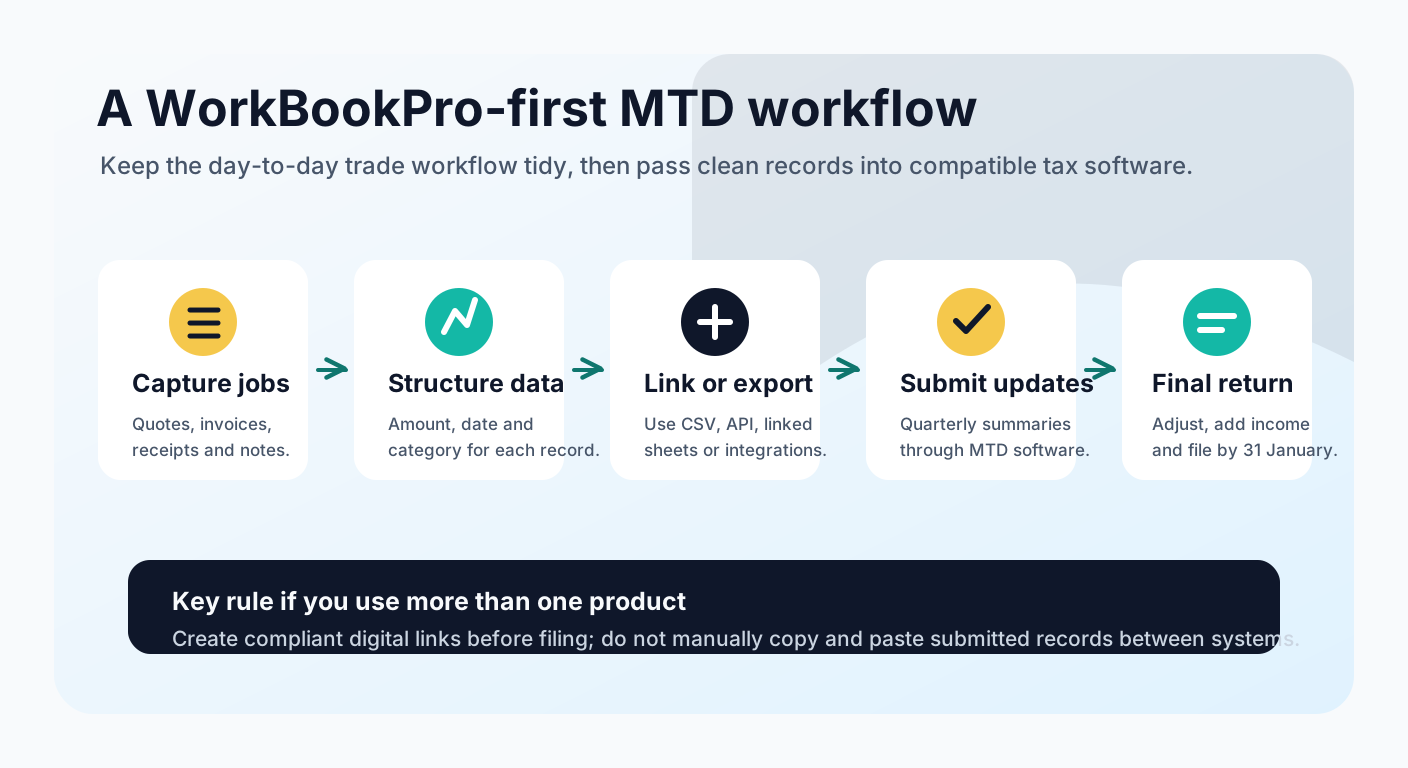
This distinction matters. WorkBookPro helps you run the trade business and keep the operational records clean. MTD submissions themselves need to be made through HMRC-recognised compatible software, or through a compliant combination of products that together cover digital records, quarterly updates and the final tax return.
If you already use an accountant, agree who owns each step: who keeps the records, who checks categories, who sends quarterly updates and who files the final return.
Do You Need Bridging Software?
Possibly. HMRC recognises that some businesses will use more than one product.
There are two broad software routes:
- All-in-one MTD software that creates records, sends quarterly updates and files the final tax return.
- A connected workflow where your records are kept in one place and bridging or tax software submits to HMRC.
If you use more than one product, HMRC requires digital links between the record-keeping software and the software used for submissions. CSV import and export, linked spreadsheet cells, API transfer and automated transfer can all be part of a digital-link workflow.
What you should avoid is rebuilding the numbers manually after the fact. Once digital records have been used for a quarterly update, HMRC says you must not move them by typing them out again, cutting and pasting, or copying and pasting into another product.
The Main Risks for Trades Businesses
The biggest MTD problems are likely to come from everyday trade-business habits, not from the tax rules themselves.
Waiting until the quarter closes. If you only sort paperwork every three months, the update becomes a scramble. A weekly or monthly rhythm is much easier.
Mixing personal and business spending. Bank feeds help, but they do not solve everything. Keep business costs separate where you can and add missing detail before you submit.
Using vague categories. "Materials" is useful. "Stuff" is not. Cleaner categories now mean fewer awkward questions later.
Forgetting property income. If you have a rental property as well as your trade, both can count toward the threshold.
Assuming software is enough on its own. Software keeps the trail, but you still need a process: receipts captured, costs categorised, invoices raised and data reviewed.
A Practical Readiness Checklist
Use this checklist to turn the rules into an operating routine:
| Area | Action |
|---|---|
| Scope | Check your 2024 to 2025 Self Assessment return for gross self-employment and property income over £50,000. |
| Software | Confirm which HMRC-compatible software or bridging software will submit the quarterly updates and final return. |
| WorkBookPro setup | Keep quotes, jobs, invoices, expenses and notes in one consistent workflow. |
| Categories | Map your income and expense categories to the records your accountant or tax software needs. |
| Evidence | Keep receipts, invoices and statements linked or easy to retrieve. |
| Rhythm | Close out records monthly so quarterly updates become a review step, not a rebuild. |
| Responsibility | Decide whether you, your bookkeeper or your accountant will submit each update. |
| Review | Check your profit, cash flow and tax estimate regularly rather than waiting for year-end. |
Why This Can Be More Than a Compliance Exercise
MTD can feel like another admin burden, especially if you are already juggling quotes, jobs, invoices, suppliers and late payments.
But there is a useful upside: the businesses that prepare well get better visibility earlier. If your records are current, you can see which jobs are profitable, which costs are creeping up and whether your cash flow is strong enough before the final tax bill arrives.
That is the real opportunity for trades businesses. Do not treat Making Tax Digital as something that starts at filing time. Treat it as a reason to tighten the workflow from quote accepted, to materials bought, to invoice sent, to cost reviewed.
WorkBookPro free trial
Keep job records ready for your accountant
Use WorkBookPro to keep quotes, invoices, expenses and job profitability organised before quarterly record checks become urgent.
- Create your first real job in minutes
- Keep jobs, costs, invoices, files and notes together
- Use it on phone, tablet or desktop
No card required. Plans start from GBP 20/month after trial. Cancel anytime.